
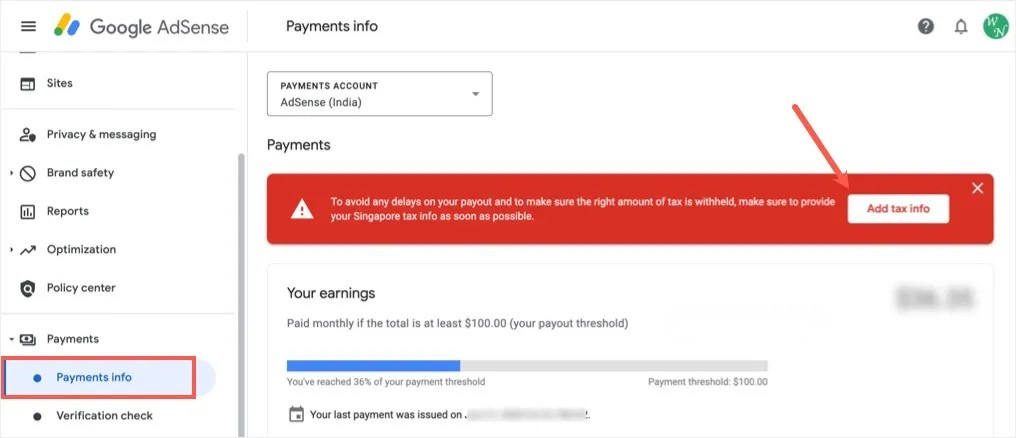

Seeing a payment error in your AdSense dashboard asking for additional tax documents? If you’re based in India and selected the Singapore tax exemption option, this guide walks you through exactly how to resolve it — step by step — using a Tax Residency Certificate (TRC).
Understanding the AdSense Tax Residency Error
If you’ve recently updated your tax information in Google AdSense and selected Singapore as your tax country along with a Yes on the tax exemption question, you may have encountered this payment warning:
This error doesn’t mean your account is suspended or your payments are stopped permanently. It simply means AdSense needs proof that you are genuinely a tax resident in India before it can apply the Singapore DTAA tax exemption to your earnings. Until you provide that proof, Google will tax your AdSense income at the default (higher) rate.
The Quick Fix (No TRC Required)
If you don’t want to go through the process of obtaining a Tax Residency Certificate, there is a fast and simple workaround. In your AdSense account, go to Payments → Manage payments info → Singapore tax info and click Update Tax info. On the tax exemption question, simply select No instead of Yes.
This will immediately clear the document verification error. Your payments will resume without interruption, and the warning message will disappear within a few hours.
What Is DTAA and Why It Matters for AdSense Earners
The Double Taxation Avoidance Agreement (DTAA) is a bilateral tax treaty signed between two countries to ensure that the same income is not taxed twice — once in the country where it’s earned and again in the country where the earner resides.
In the context of AdSense, your ad revenue technically flows through Google’s Singapore entity. Without the DTAA exemption, India-based creators could end up paying tax on that income both in Singapore and in India. The DTAA eliminates or significantly reduces this double burden — which is why claiming the exemption is worth it if you earn consistently from AdSense.
If you’re actively working to grow your AdSense income, improving how your ads are placed is just as important as managing your tax setup. One of the most effective changes you can make is adding a sticky footer ad to your WordPress site — it keeps your ad visible throughout the entire session and significantly boosts your click-through rate.
Who Is Eligible to Apply for a TRC in India?
Not every AdSense user in India automatically qualifies for a Tax Residency Certificate. You must meet the following basic criteria under Indian tax law:
Physical Presence in India
You must have stayed in India for 182 days or more during the relevant financial year. This is the primary test for establishing tax residency status under Indian law.
Filed Your Income Tax Return (ITR)
You should have filed your ITR for the previous financial year. The Income Tax Department will verify this as part of processing your application.
Valid PAN Card
A Permanent Account Number (PAN) is mandatory for all tax-related applications in India, including the TRC application.
Documents You Will Need
| Document | Purpose | Status |
|---|---|---|
| PAN Card | Tax identity verification | Required |
| Aadhaar Card or Passport | Proof of residency and identity | Required |
| Passport-sized photographs | Application submission | Required |
| Filed ITR (previous year) | Proof of tax filing and income | Required |
| Bank statements | Evidence of income and financial activity | Required |
| Utility bills / rental agreement | Supporting address proof | Recommended |
| Completed Form 10FA | Official TRC application form | Required |
Step-by-Step: How to Apply for a Tax Residency Certificate (TRC) in India
There is no online portal to apply for a TRC in India. The entire process is handled offline through your local Income Tax office. Here’s how to do it:
Make sure you have been physically present in India for 182 days or more in the financial year for which you are applying. Also confirm that your ITR for the previous year has been filed and acknowledged by the Income Tax Department.
Form 10FA is the official application form for requesting a Tax Residency Certificate in India. Download it from the Income Tax Department’s official website (incometax.gov.in). Fill it out carefully, providing your full name, PAN, address, the financial year for which the certificate is needed, and the country for which the certificate is being claimed (Singapore, in this case).
Compile all the documents listed in the table above. Make sure you have both originals and photocopies ready for submission. Some Assessing Officers may ask for notarized copies, so it’s worth preparing those in advance.
Submit your completed Form 10FA along with all supporting documents to your jurisdictional Assessing Officer at the local Income Tax office. To find out who your AO is, log in to the Income Tax e-filing portal and check your profile details — your AO’s name, designation, and ward number will be listed there.
The Income Tax Department will review your documents and verify your residency status. Processing time typically ranges from a few weeks to a couple of months, depending on your location and the workload at the tax office. You may be contacted for additional documentation during this period.
6.Receive Form 10FB — Your Official TRC
Once approved, the Income Tax Department will issue Form 10FB, which is your official Tax Residency Certificate. This document confirms that you are a tax resident of India for the specified financial year and can be used to claim DTAA benefits in Singapore — and with AdSense.
How to Submit the TRC in Your AdSense Account
Once you have your Form 10FB in hand, submitting it to AdSense is straightforward:
In your AdSense dashboard, navigate to Payments → Manage payments info and scroll to the Singapore tax info section. Click Update Tax info.
This time, select Yes on the tax exemption question. A document upload section will appear.
From the document type dropdown, select Tax Residency Certificate. Then click the upload button and attach a clear scan or photo of your Form 10FB.
Submit the form. AdSense will review your uploaded certificate. The payment error and document warning will typically be cleared within a few hours to a few business days after the review is complete.
Important Tips to Keep in Mind
Before you go, here are a few things that will save you time and frustration throughout this process:
Sorted Your Tax Info? Now Maximize Your Earnings
Getting your tax residency in order is a smart move that saves real money over time. Once your AdSense account is fully compliant and your DTAA exemption is active, the next step is making sure your ad placements are actually working hard for you. A sticky footer ad is one of the easiest ways to increase your CTR and revenue without adding more content.